• Work
  • About
  • Blog
  • Contact
Menu

David Lux

Brand · Growth | Orange County, California
  • Work
  • About
  • Blog
  • Contact

Packing List: What to Know Before CES 2026

December 3, 2025

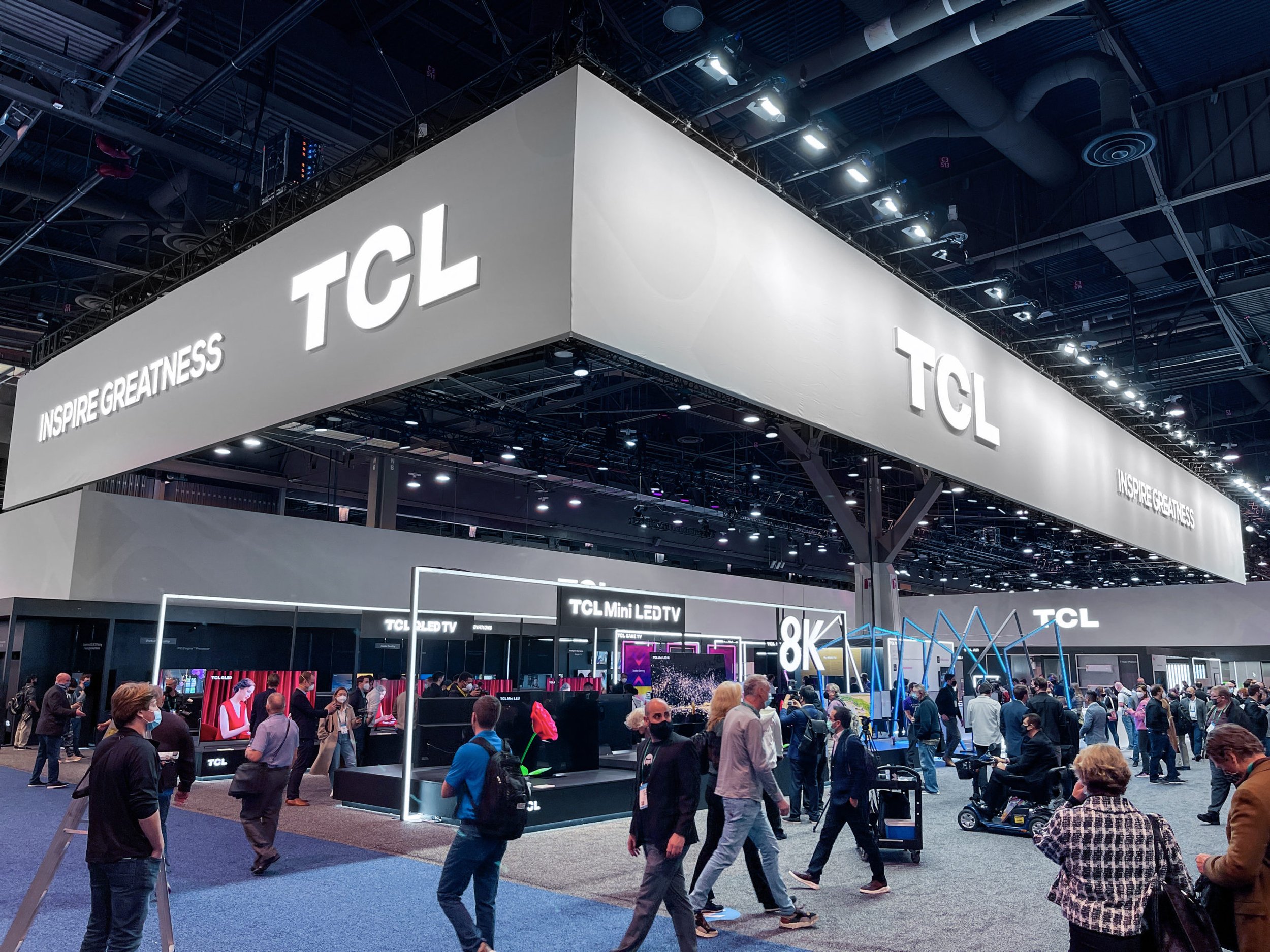
It’s that time again, CES is upon us! As many celebrate the Holidays spanning Thanksgiving, Christmas and the New Year, the consumer electronics industry is busy at work preparing for its biggest, most influential trade show of the year. That’s right, as soon as the Times Square ball drops, it’s a last-minute scramble to finish preparation for the Consumer Electronics Show in Las Vegas—the premier launchpad for innovation, from televisions to next-generation car electronics, smart home devices, and so much more.

Commonly known as CES, the show is expected to attract more than 130,000 consumer tech insiders including manufacturers, retailers, media, and more.

What’s the attraction? Well, it’s the one place where the latest technology goes on display for all to see, and it provides a sneak peek at the new gadgets and trends that will shape the consumer experience in the year ahead.

While CES does bring with it glorious tech-filled days, it’s also a brutal endeavor filled with massive crowds, endless lines, and it is daunting to navigate the seemingly endless exhibit space.

For those venturing to their first CES in 2026, or for veterans looking for a refresher, here are a few survival tips that I’ve learned along the way.

CES Survival Tip #1: It’s All About the Shoes

CES is spread over multiple convention centers and countless hotels around the Las Vegas strip. While the exhibit halls at the Las Vegas Convention Center (LVCC) have set hours, chances are your working hours will far exceed those times. Opt for sneakers over dress shoes, and layer your clothing to adapt to changing temperatures inside the halls and outside. Regardless of your schedule or planned attire, wear comfortable, broken-in footwear—it will be crucial to your survival!

CES Survival Tip #2: Hydrate, then Hydrate More

Las Vegas is a desert—dry and unforgiving. Plus, with long hours, running to meetings around town, and constant networking, it’s very easy to forget to drink water. Keep a water bottle handy and refill often; staying hydrated is your best defense against burnout and the dreaded "Vegas Voice."

CES Survival Tip #3: Rest Up When You Can

A good night’s sleep is probably rare in Las Vegas regardless of the time of year, but it’s especially difficult during CES. Between early mornings on the show floor and late-night dinners with customers, colleagues, and partners, the days can be extremely long. Find time to get off your feet when you can and prioritize sleep where possible. Remember, when it comes to CES, it’s a marathon, not a sprint.

CES Survival Tip #4: Always Give Yourself Extra Time

Normally in Las Vegas, getting around is pretty easy, thanks to plenty of taxis and no shortage of rideshare options. But with the influx of people in town for the biggest show in Tech, just getting a cab can feel like an eternity. If you have a meeting you’re trying to get to at the booth in the sprawling LVCC, or elsewhere on the strip, always pad the amount of time you expect it will take to get there—you are going to need that buffer.

CES Survival Tip #5: Master the Maze

Las Vegas hotels are intentionally designed to be labyrinths. However, it is sometimes better to cut right through the hotels to get to your next destination, rather than walking around them or waiting in long taxi lines. Make time to familiarize yourself with the layouts of the convention centers and the hotels you know you’ll be visiting. You might just find that navigating through the indoors is quicker, so long as you don't get lost in the maze of the casino (hat tip M. Brandon Lee)!

CES Survival Tip #6: Prioritize Health

Things have been back to normal for a while, but even in a typical year, the sheer number of people from around the world, together in tight spaces, poses a health risk. It's always important to get plenty of rest, eat healthy meals, and review the latest health and safety guidelines. Consider carrying masks, keep your distance from fellow attendees if you're feeling under the weather, opt for outside air flow and open spaces whenever possible, and never be far from hand sanitizer.

CES Survival Tip #7: The "Don’t Get Stranded" Tech Kit

It is a cruel irony that at the world’s largest tech show, your devices will likely die before lunch. Between the constant Wi-Fi hunting and the dead zones in the LVCC that murder your battery, you need a dedicated power plan. Carry a high-capacity power bank and your own wall brick; don't count on finding one of those sponsored charging stations open or a free outlet in a hallway.

CES Survival Tip #8: Learn Something New

There’s a lot of work that goes into CES before the show's official start, and many grueling hours once you hit the floor. But after many years of attending this show, there’s truly nothing quite like it.

CES showcases new and revolutionary technology. It’s where tech trends for the year ahead begin. It is the one place where the world comes to display the latest innovations, and not just in areas near and dear to me, such as home entertainment, smart home gadgets, and automotive tech.

As both a marketer and as someone who loves technology, there’s a lot to absorb. Take plenty of pictures. Bring a pocket notebook to take notes. Be sure to capture interesting things you see, even if they aren't directly related to your primary focus.

Just make sure you come away from this event with some new insights and learnings.

In Technology Tags ces, consumer electronics, 2026
smart shopping carts

Cashierless Checkout is Finally Coming

October 5, 2022

Back in grad school I had a research project where I prototyped an easier way to shop inside a grocery store. 

While there have been plenty of improvements in e-commerce and online shopping over the years, going into a physical market to shop for items that go into our refrigerators is still arduous. 

For my research, I spent an uncomfortable amount of time in local grocery stores to document some of the pain points. My findings reinforced a simple truth – shopping in large supermarkets was unnecessarily inefficient.

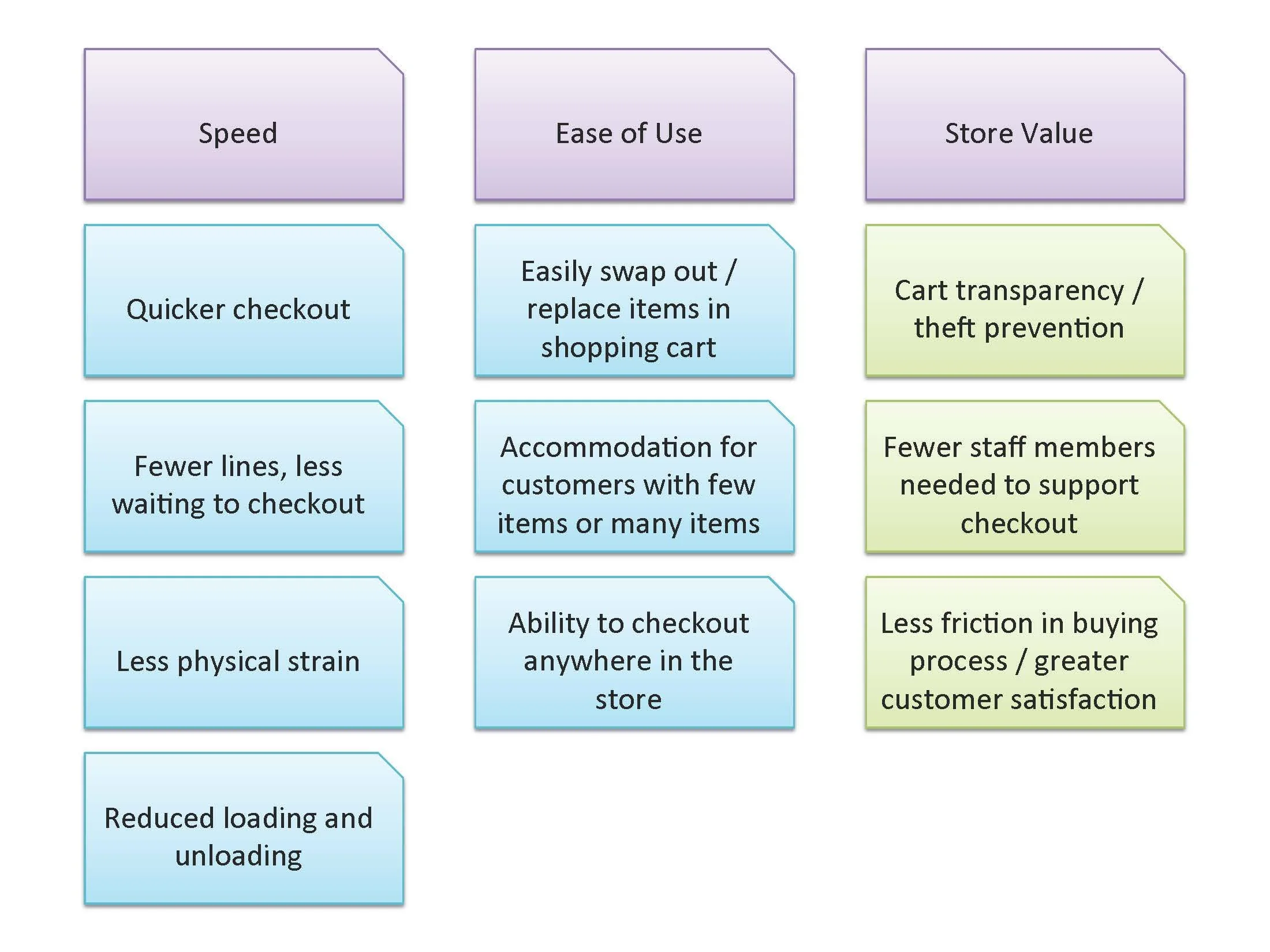
For example, once customers add all necessary items to a shopping cart, they must endure long lines to checkout. This checkout process then requires emptying out all of the items in the shopping cart onto a conveyor belt, where a store clerk scans each item individually by hand. Typically an additional store clerk is required to refill the shopping cart once again. 

This process is not only slow, but physically grueling.

Clearly, there was a huge opportunity to make this process faster and less analog. It became apparent to me that a self-scanning system could reduce the repetitive lifting that customers would typically have to perform, not to mention the filling, emptying, and re-filling of a shopping cart.

Years before the first Amazon Go stores opened, my design for cashierless checkout was inspired by a single piece of technology that is abundant in many retail stores, but is almost never present in supermarkets: RFID tags.

The prototype I made would require supermarkets to outfit shopping carts with RFID readers, as well as digital displays to provide users with feedback on what they were adding to their physical carts. It was aimed at helping customers get in and out of the store in less time, while also limiting friction in the process and reducing customer frustration.

It’s incredibly rewarding to see that Amazon continued to build on this same concept to make the physical shopping experience smoother. 

More recently, Amazon has even announced that it’s expanding this experience, along with its own smart shopping carts, to Whole Foods locations next year. 

What was exciting about my concept, as well as Amazon’s iterations, is that cashierless shopping isn’t as revolutionary as it may seem. 

RFID and even QR codes are not new technologies. RFID tags are less than 1 mm thick and can be attached to all items. While bar codes require manual operation, RFID tags can wirelessly transmit data, so that collecting product information can happen within seconds.

Over the past year, fast fashion retailer Uniqlo has also released self-checkout machines using this same concept, which quickly reduced queue times in-store.

It just goes to show how a fresh perspective, and a new application for something already available, can dramatically reshape the most basic experiences.  

In Technology Tags amazon, cashierless shopping, hci
wfh tech essentials

Getting Things Done: 7 WFH Tech Essentials

September 12, 2022

The right technology can really elevate your home office set up and boost productivity.

I’ve picked out seven of my favorite work from home tech essentials that have helped me stay connected and do more, especially as I’m working from home most of the time with occasional visits to the office.

Whether you want to improve your workspace, or find gift ideas, these tech essentials have worked for me, so maybe they can also enhance your workspace and productivity.

MacBook Air M2

The center of my home office has long been an iMac. I had a first-gen Intel 27” model and it worked like a champ for more than a decade! It was hard to part with it, but needless to say, it was time for an upgrade.

Although I considered a new iMac, I couldn’t wait for Apple to introduce another large screen version of its latest generation all-in-one. Plus, I kind of wanted something I could take with me when I’m traveling. So, I picked up a 32” monitor and paired it with the new MacBook Air M2.

This laptop is thin, lightweight, and gorgeous. But thanks to the M2 processor, it’s practically Pro.

I had considered a MacBook Pro 13” with the M2, but discovered the MacBook Air M2 offered a better webcam, nicer speakers, more modern looking display, fast-charging support, all in a lighter package. It was a no-brainer to go with the Air M2 and I couldn’t be happier, especially since I felt it was a better value over the Pro model.

CalDigit Thunderbolt 4 Element Hub

Naturally, there are multiple devices in my home office and I needed a way to tether everything together. One challenge was that I also had two laptops – one personal and one for work – that I needed to toggle between seamlessly.

The solution: CalDigit’s Thunderbolt 4 Element Hub. Harnessing the power of Thunderbolt 4, this simple dock provides an incredible amount of flexibility for my home office set up.

I use the dock to connect my 4K monitor, laptops, a couple external SSD drives, a keyboard and mouse, plus charge devices like headphones and my mobile phone.

As mentioned, I togged between work and personal laptops, and this dock makes the process simple. I just unplug the one Thunderbolt cable between them, and I’m good to go.

Audio Technica ATH-M20xBT

One of my newest tech additions are these over-ear headphones. I had been in the market for premium headphones for a while and was so close to pulling the trigger on a pair of $299 cans that offered premium design and sound.

But then Audio Technica introduced these bad boys…

They’ve got a no frills design and don't have fancy features like companion apps or carrying cases. But in terms of sound, they really deliver.

While they may not look like $299 headphones, they’re super lightweight. I usually wear glasses while I’m working at the computer, and still the lightweight design of the ATH-M20xBT headphones make them comfortable to wear for long periods.

The 40MM drivers crank out Audio Technica’s unique sound signature that’s tuned for clarity. Everything is clear, and you’ll never hear anything too crazy. These deliver deep bass, excellent mids, and bright highs without harshness.

For just $80, these hit well above their weight class. I’ve also been using them for all of my calls and the mic does a great job of picking up dialogue while reducing ambient room noise, even without ANC support. Plus, they have a crazy battery life of 60 hours so I don’t have to worry about plugging them in constantly. You can even listen to music wired or via Bluetooth, so they’re super flexible.

eero Mesh Wi-Fi Routers

The key to productivity is good Wi-Fi. So for me, eero’s mesh Wi-Fi routers are essential.

Mesh Wi-Fi routers like eero help to eliminate dead zones by using multiple pods that work in unison to blanket your home with fast, stable coverage.

Unlike traditional routers, eero is super easy to set up and is controlled by a powerful, yet easy to use app. I also subscribe to eero Secure which adds an extra level of security to my network.

In addition to supporting my WFH activities, eero supports all my smart home’s needs. From my TCL TV, to my Nest doorbell, Sonos speakers, or smart lights in my backyard, having Wi-Fi that’s fast, stable, and keeping everything connected in every corner of the house (inside and outside) is pretty awesome.

I’ve also upgraded to eero’s latest generation of routers that support Wi-Fi 6. So, as I add more devices around my house supporting Wi-Fi 6, I know that my WFH set up — and my smart home in general — is future proofed.

Litepro Laptop Stand

I’ve got a hybrid schedule where I bounce between my home office and work office. However, I’m at home most of the week and discovered that a laptop stand is essential.

Litepro’s laptop stand is pretty basic, but it raises your laptop about five or six inches to improve ergonomics if you’re using your laptop’s screen as a second monitor, like I do.

It's lightweight and sturdy, plus it’s super easy to move around your desk. The forward tilt and open design also allows for improved airflow to keep your laptop cooler.

Since there are two laptops on my desk, what’s great about the design is that I’m also able to tuck my personal laptop underneath my work laptop to keep my workspace organized and tidy.

TCL 20 Pro 5G

TCL is known for creating products that punch above their respective weight classes, with a level of performance that usually belies their price tags. That can certainly be said for the TCL 20 Pro 5G which is why it’s still my daily phone of choice.

Although specs alone won't suggest a major leap forward, I can attest to the TCL 20 Pro’s reliable software, incredible build quality, and gorgeous design.

First and foremost, TCL’s expertise in display technology is evident in the 20 Pro. The display is bright, colorful, and is easy on the eyes, no matter what I'm watching or reading. The processing also makes it buttery smooth while jumping between apps or scrolling through long pages.

One of my favorite features is the SmartKey. It's an extra button on the side that can be programmed to do quick tasks. Unlike other manufacturers, TCL makes it easy to quickly launch just about anything with SmartKey. I personally use it to close background apps in a pinch.

The phone is fast, smooth, and shows no signs of sluggishness moving between apps or while browsing the web. Even the camera processing for modes like Portrait and Super Night photos feels fast.

Something that might get lost in reviews, but that I really appreciate as a former Pixel user, is the lack of bloatware. Beyond some basic software like TCL's excellent NXTVISION technology, or theme improvements, the phone isn't too far off from stock Android.

Sonos One

There are many multi-room speakers available these days, but in my opinion you still can’t go wrong with the Sonos One.

I’ve got one in just about every room of the house because they make multi-room listening so easy. For work, it’s satisfying to quickly cue up some ambient music on Spotify and play over the One.

Sound quality is excellent. Every time I listen I can’t believe how much detail and rich bass can be achieved in such a small package.

With both Alexa and Google Assistant built in, not to mention AirPlay support, Sonos has also made it easy to control music and incorporate the One into any smart home ecosystem.

In Technology Tags productivity, reviews
kindle.jpg

Physical Books Offer Better Comprehension, Usability Than eBooks

June 22, 2015

Thanks to the rise of tablets and e-readers like Amazon's Kindle, traditional booksellers have been hurting over the last few years. And while the popularity of the ebook and digital publications has eaten away at book sales, Nielsen BookScan -- which tracks what readers are buying -- found that paper book sales actually increased 2.4-percent last year. This figure includes sales of books through Amazon and other bookstores.

GreekWire writer Frank Catalano dove deeper into this increase and considers some of the not-so-obvious reasons for the paper book's sudden resurgence.For starters, Catalano noted that numerous studies have been conducted that prove we read text differently when it’s printed on a page, compared to on a screen. On websites, text is often skimmed. And, studies have shown that the same is true when it comes to the text of ebooks. As a result, readers tend to have far better comprehension when they're reading from a physical book.

Additionally, when it comes to making highlights, annotations, or just bookmarking a page, tablets and e-readers have some amazing tools. However, studies have shown that many of these added tools and virtual sticky notes are often too complicated to use. Different platforms also have different menus, icons, and conventions, often making them less user-friendly than simply grabbing a pen or highlighter and marking up a page.The author notes other factors as well, such as the general feel and smell of a book that gets lost when they’re in digital form. Many studies have suggested that using backlit screens can also interfere with sleep.

Personally, I love the convenience of digital books. They’re usually less expensive and I can download a new book in a matter of seconds. But there’s something about reading a paper book that is definitely more enjoyable. As this article says, "real" books also have a UI and UX that benefits from centuries of refinement.

In Technology

Copyright © 2026 David Lux